New in EyeRehab Pro: a Patients Worklist Built for Real Caseloads
EyeRehab Pro's Patients page now supports attention-based worklists, server-backed search, sorting, page size controls, and pagination for clinics managing growing patient panels.
VOR Eye Rehab Team
Published on June 7, 2026
Listen to this article
Natural Language Narration · 5 min
Quick answer
What changed in the EyeRehab Pro Patients page?
The Patients page is now a caseload worklist with attention filters, backend search and sorting, page size controls, pagination, and patient-level badges for issues such as inactivity, low adherence, missing programs, Care Loop activity, and billing status.
Small panels are easy to scan. Real clinics do not stay small for long.
The original EyeRehab Pro Patients page worked when a clinician had a handful of connected patients. It showed who was active, who was paused, the last exercise session, total sessions, and the current program. That was enough for a five-patient demo, but it did not answer the operational question a clinic asks every morning:
Who needs attention first?
We rebuilt the Patients page around that question.
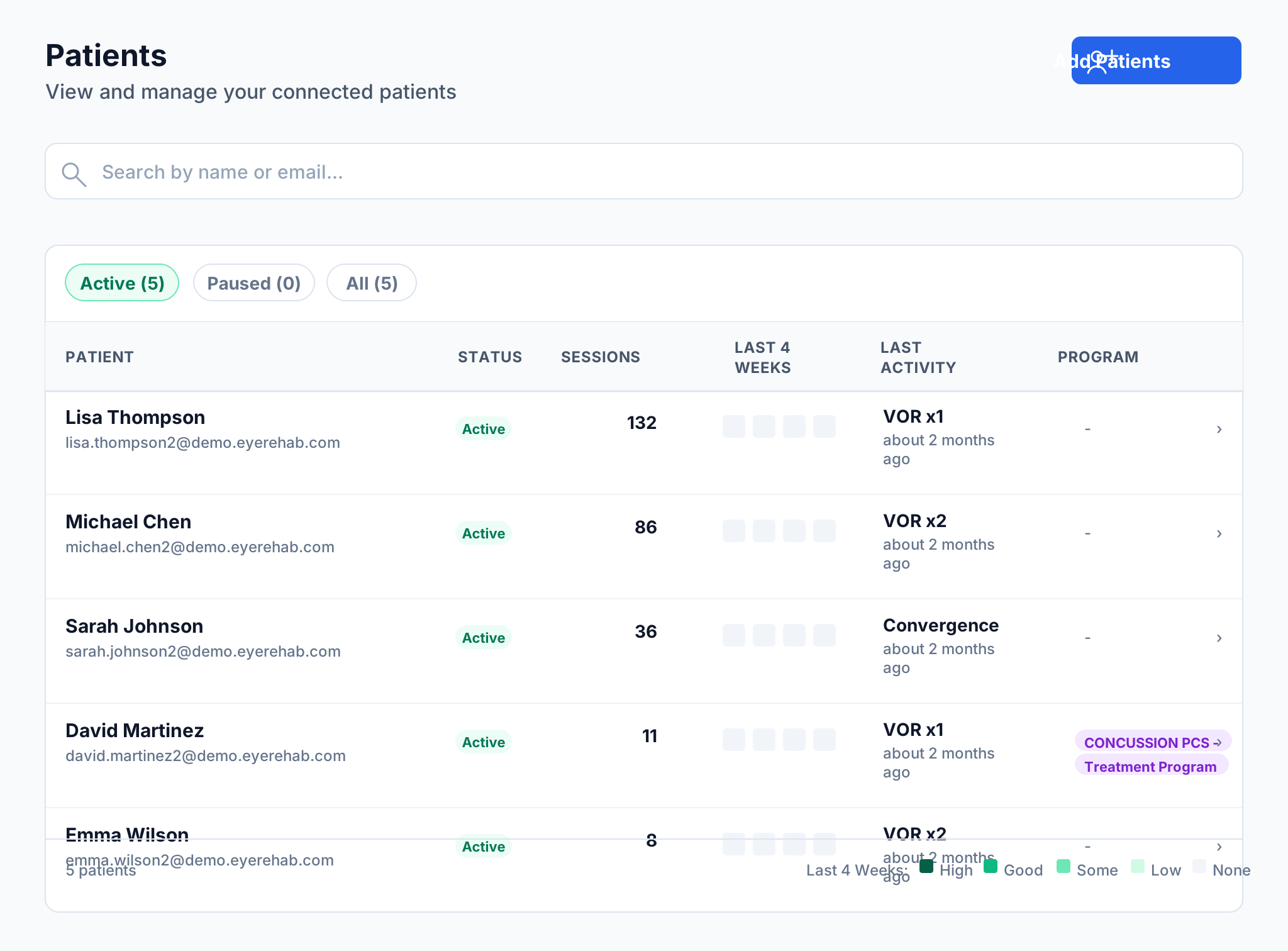
Before: a roster that worked only while the panel was small
The previous page was a clean roster. It had search and basic Active, Paused, and All tabs. For a clinic managing five patients, that was acceptable.
For a clinic managing dozens of vestibular or concussion patients, the clinician still had to visually inspect every row, remember which patients had not trained recently, notice who had no program, and scroll without a page structure.
After: a worklist for clinical exceptions
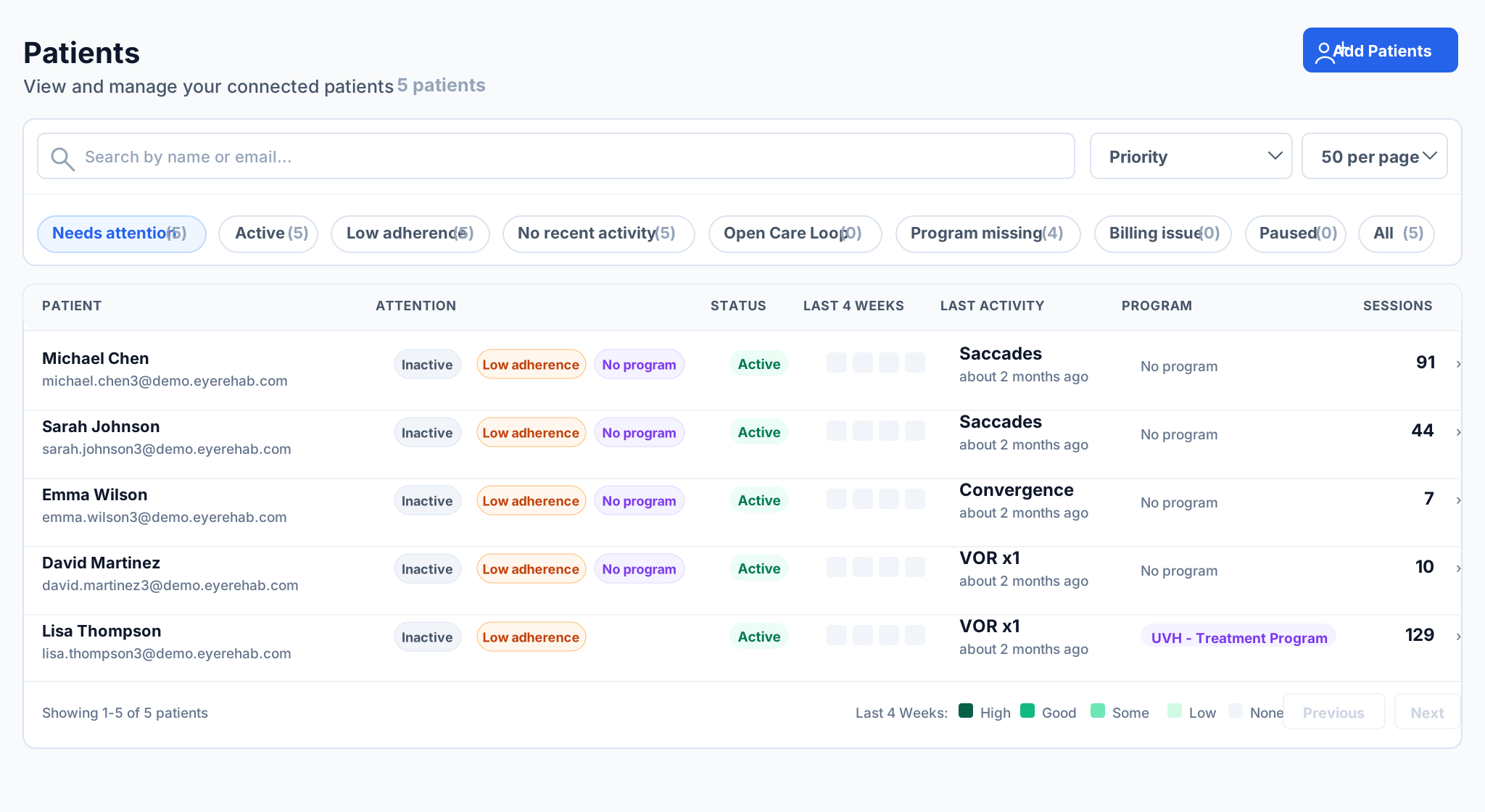
The updated page starts with Needs attention, then lets the clinician narrow by the reason a patient may need review:
- Low adherence: patients with very little recent home exercise activity.
- No recent activity: patients whose last session is stale or who have not started.
- Open Care Loop: patients with active communication or follow-up issues.
- Program missing: active patients without a current assigned program.
- Billing issue: patients whose clinic-paid access needs billing review.
- Paused and All: preserved for standard roster management.
What changed
1. Attention badges explain why a patient is surfaced
Instead of forcing the clinician to infer risk from multiple columns, each row can show concise badges such as Inactive, Low adherence, or No program. The badge is not a diagnosis and does not replace clinical judgment. It is a worklist cue: this patient may deserve a quick look before routine follow-up.
2. Counts are based on the full roster, not just the visible page
If a clinic has 80 patients and the page is showing 50, the filter counts still reflect the full searched roster. That matters because a worklist count should not change simply because the clinician is on page 1 instead of page 2.
3. Search, sorting, and pagination now happen on the server
The old page filtered whatever had already been loaded in the browser. The new page requests the exact view the clinician asked for: search term, worklist view, sort order, page, and page size.
That means the interface is ready for a clinic with dozens of patients instead of assuming the whole roster should always be loaded and filtered locally.
4. Search is smoother during real use
The search input waits briefly before sending a request, so typing a name does not fire a request for every character. The page also keeps the previous result visible while the next result is loading, which avoids the table flashing empty during normal work.
5. Pagination is now explicit
Clinics can choose 25, 50, or 100 patients per page and use Previous and Next controls. For a solo provider, 50 may be enough. For a multi-provider clinic, pagination keeps the page predictable as the patient panel grows.
Why we did not just add pagination
Pagination alone would have solved the scrolling problem, but not the workflow problem.
A vestibular clinician does not open the Patients page just to admire a list. They open it to decide where attention should go:
- Who stopped doing exercises?
- Who has no current program?
- Who messaged or triggered a Care Loop issue?
- Who is active clinically but blocked operationally?
- Which patients are routine and can wait?
That is why the new design is a caseload worklist rather than just a longer table with page numbers.
Built for the target user: busy clinicians and clinic operators
The target user is not a consumer browsing a health app. It is a physical therapist, vestibular clinician, concussion provider, clinic owner, or operations lead trying to manage patient follow-through between visits.
For that user, a patient table has to be quiet, dense, and decisive. It should not require detective work. It should make the next action easier to see.
This update moves EyeRehab Pro closer to that standard: less roster scanning, more caseload control.
Available now in EyeRehab Pro
The updated Patients worklist is available in the EyeRehab Pro Portal. Existing connected patients will appear automatically with the new worklist filters, attention badges, sorting controls, and pagination.
As always, the worklist is designed to support clinical review. It does not replace professional judgment, diagnosis, treatment planning, or documentation requirements.
Tags
Written by
VOR Eye Rehab Team
Expert insights on vestibular rehabilitation and eye health.
Related Articles
Choosing Vestibular Rehabilitation Software: A Clinician's Evaluation Checklist
An evidence-informed checklist for vestibular clinicians evaluating rehabilitation software, remote monitoring platforms, and home-exercise delivery tools.
Eye Rehab Editorial Team
October 29, 2026
Why Does Scrolling on My Phone Make Me Dizzy?
Learn why scrolling may provoke dizziness, practical ways to reduce screen motion, and when symptoms need a visual, vestibular or medical assessment.
Ilyas Bakouch, Founder of EyeRehab
October 7, 2026
Find a Provider: 735 Clinic Listings Now in Eye Rehab
Browse 735 clinic listings in Eye Rehab. Search by clinic name or city, filter by specialty, and learn what happens when you send a connection request.
Ilyas Bakouch, Founder of Eye Rehab
September 5, 2026