Introducing Gaze Trace Review for In-Clinic Visual Therapy
VOR Eye Rehab now shows clinicians how a patient's real eye movements compare with the moving target they were asked to follow during projector sessions.
VOR Eye Rehab Team
Published on June 7, 2026
Listen to this article
Natural Language Narration · 6 min
Quick answer
How can clinicians see whether a patient actually followed the moving target during an in-clinic visual therapy session?
Gaze Trace Review overlays the expected target path with the patient's recorded gaze path and heat-map density, so clinicians can quickly see deviations after supported projector sessions.
Reviewed on June 7, 2026
In visual therapy, the instruction can sound simple: “follow the moving target.”
The hard part is knowing what actually happened.
A patient may appear engaged. They may report that they followed the target. The clinician may notice occasional loss of tracking, but the room is busy, the target is moving, and the clinician is also managing speed, symptoms, posture, and session timing. A short observation can miss the pattern.
VOR Eye Rehab now adds Gaze Trace Review for supported in-clinic projector sessions. After a session is saved, the Pro Portal can show the expected target path and the patient’s recorded gaze movement in the same visual panel.
The goal is not to replace clinical judgment. The goal is to make the signal visible.
What the Clinician Sees
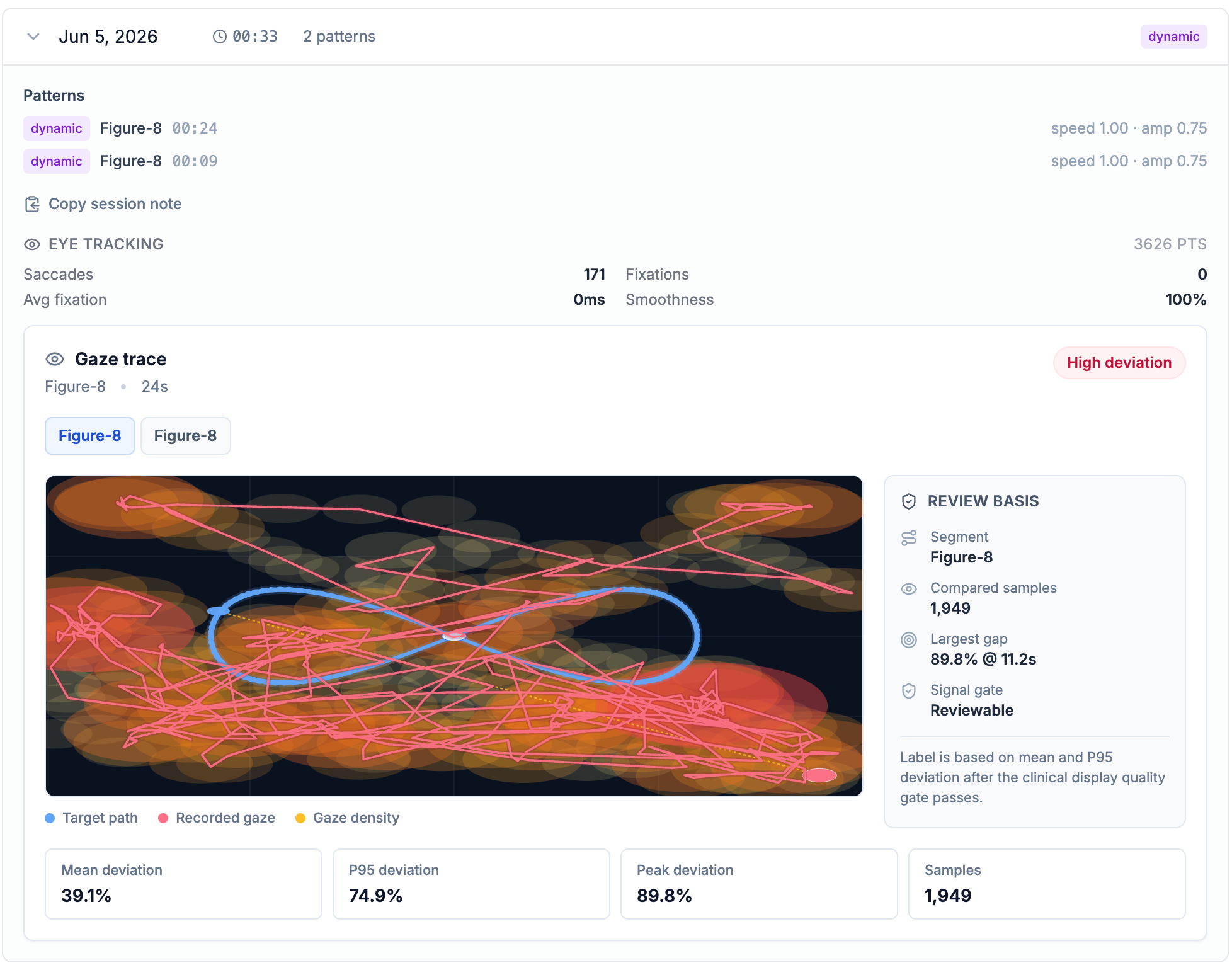
The screenshot below shows a Figure-8 projector session.
In this example:
- The blue Figure-8 outline is the path the moving target followed.
- The red trace is the patient’s recorded gaze movement.
- The heat-map density shows where gaze samples clustered.
- The system labeled the segment High deviation.
- The review panel reported 39.1% mean deviation, 74.9% P95 deviation, and 1,949 usable samples for the selected segment.
This is the kind of case where a text-only session summary would be weak. “Figure-8, 33 seconds, speed 1.00, amplitude 0.75” tells the clinician what was prescribed. The trace shows how the patient responded.
Why This Matters
Large-field visual therapy asks the patient to coordinate attention, eye movement, head position, and symptom tolerance while a target moves through space. The clinically useful question is not only whether the session was completed. It is whether the patient could stay with the task.
Gaze Trace Review helps answer questions like:
- Did the patient stay near the target path?
- Did they drift below or above the pattern?
- Did they lose the target during direction changes?
- Was the session captured with enough quality to review?
- Did a later attempt look cleaner than an earlier attempt?
That last question matters. In-clinic visual therapy is often adjusted session by session. Clinicians change target speed, target size, amplitude, dwell time, pattern type, posture, symptom limits, and cueing. A visual trace gives the care team a more concrete way to compare those adjustments.
Captured Is Not the Same as Reviewable
Eye tracking data can be noisy. Camera position, lighting, face visibility, calibration quality, screen geometry, and session duration all matter.
For that reason, VOR Eye Rehab separates capture from review.
If the system records eye-tracking points but the quality gate is not met, the session can still show that data was captured, but it will not present the trace as clinically reviewable. That distinction is intentional. Weak sensor rows should not be quietly promoted into clinical evidence.
When the gate is met, the trace appears with a reviewable quality label. When the gate is not met, the clinician sees that the signal was captured but not suitable for review.
How It Works in the Visual Therapy Studio
Gaze Trace Review builds on the existing in-clinic Visual Therapy workflow:
- The clinician opens Visual Therapy Studio in the Pro Portal.
- Eye tracking is enabled for the session.
- The patient completes calibration on the display.
- The patient follows a supported moving target pattern, such as Figure-8.
- The clinician saves the Visual Therapy session to the patient record.
- The in-clinic session card shows eye-tracking metrics and, when eligible, the gaze trace visualization.
The first version supports deterministic target paths where the system can reconstruct what the patient was supposed to follow. The initial focus is on patterns like Figure-8 and other predictable target trajectories. More complex patterns will require more target telemetry before they can be reviewed with the same confidence.
What This Is, and What It Is Not
This feature is a clinical review aid.
It is not a standalone diagnosis. It does not claim why the patient deviated from the target. A high-deviation trace may reflect many things: poor calibration, visual fatigue, symptom provocation, attention, comprehension, posture, camera setup, or an oculomotor tracking problem. The clinician still interprets the result in context.
What the feature does provide is a more objective artifact from an in-clinic session: the expected target path, the recorded gaze path, the sample count, the signal quality state, and a simple deviation label.
That is a better starting point than memory alone.
Available Now in the Pro Portal
Gaze Trace Review is available for Pro Portal Visual Therapy sessions with eye tracking enabled. Use a supported dynamic pattern, complete calibration, save the session to the patient record, and open the in-clinic session card from the patient’s Clinical tab.
This is an early step toward a larger goal: turning visual therapy sessions into reviewable, quality-gated evidence that helps clinicians see what the patient actually did, not just what the protocol asked them to do.
This feature is intended to support clinician review and documentation. It does not replace professional medical judgment, diagnosis, or treatment planning.
Frequently Asked Questions
Does Gaze Trace Review diagnose an eye movement disorder?
No. It is a review aid for recorded in-clinic visual therapy sessions. It shows target-following behavior and quality-gated signal information, but clinical interpretation remains with the clinician.
What does the blue line show?
The blue outline is the expected target path for the selected projector pattern, such as a Figure-8.
What do the red lines show?
The red trace shows where the patient's gaze was recorded during the session. Wider spread or crossing away from the target path can make tracking deviations easier to review.
Tags
Written by
VOR Eye Rehab Team
Expert insights on vestibular rehabilitation and eye health.
Related Articles
Gaze Stabilization While Walking: Real-World Progression
Show how gaze stabilization can progress from seated drills to walking tasks without losing symptom control or safety.
EyeRehab - VOR Training Team
October 7, 2026

VOR Exercises for Blurry Vision With Head Movement
Connect VOR exercises to blurry vision during head movement and explain safe progression for gaze stability.
EyeRehab - VOR Training Team
September 11, 2026
Keep Your Eyes on the Target: Hands-Free Pace Audio for VOR Training
Eye Rehab 5.12.117 adds Off, Ticks, and Tones for VOR x1 and VOR x2, plus a sustained correction cue when head tracking detects persistent pace drift.
Ilyas Bakouch, Founder of Eye Rehab
September 10, 2026