New in Pro Portal: Multiple Practice Locations Under One Billing Account
VOR Eye Rehab Pro now lets clinics manage multiple locations or brands from one account, assign each patient to the right practice, and keep reports tied to the correct clinic identity.
VOR Eye Rehab Team
Published on June 7, 2026
Listen to this article
Natural Language Narration · 4 min
Clinics do not always operate as a single location with one public identity. A vestibular practice may have two clinic addresses. A provider group may run separate brands under the same billing relationship. A growing practice may start with one site and add another before it is ready for a separate account structure.
VOR Eye Rehab Pro now supports that workflow with multiple practice locations under one billing account.
Instead of forcing every patient, report, and clinic contact detail through one shared practice profile, Pro Portal now lets eligible clinics create separate practice locations, set a default, and choose the right location when onboarding a patient.
What Changed
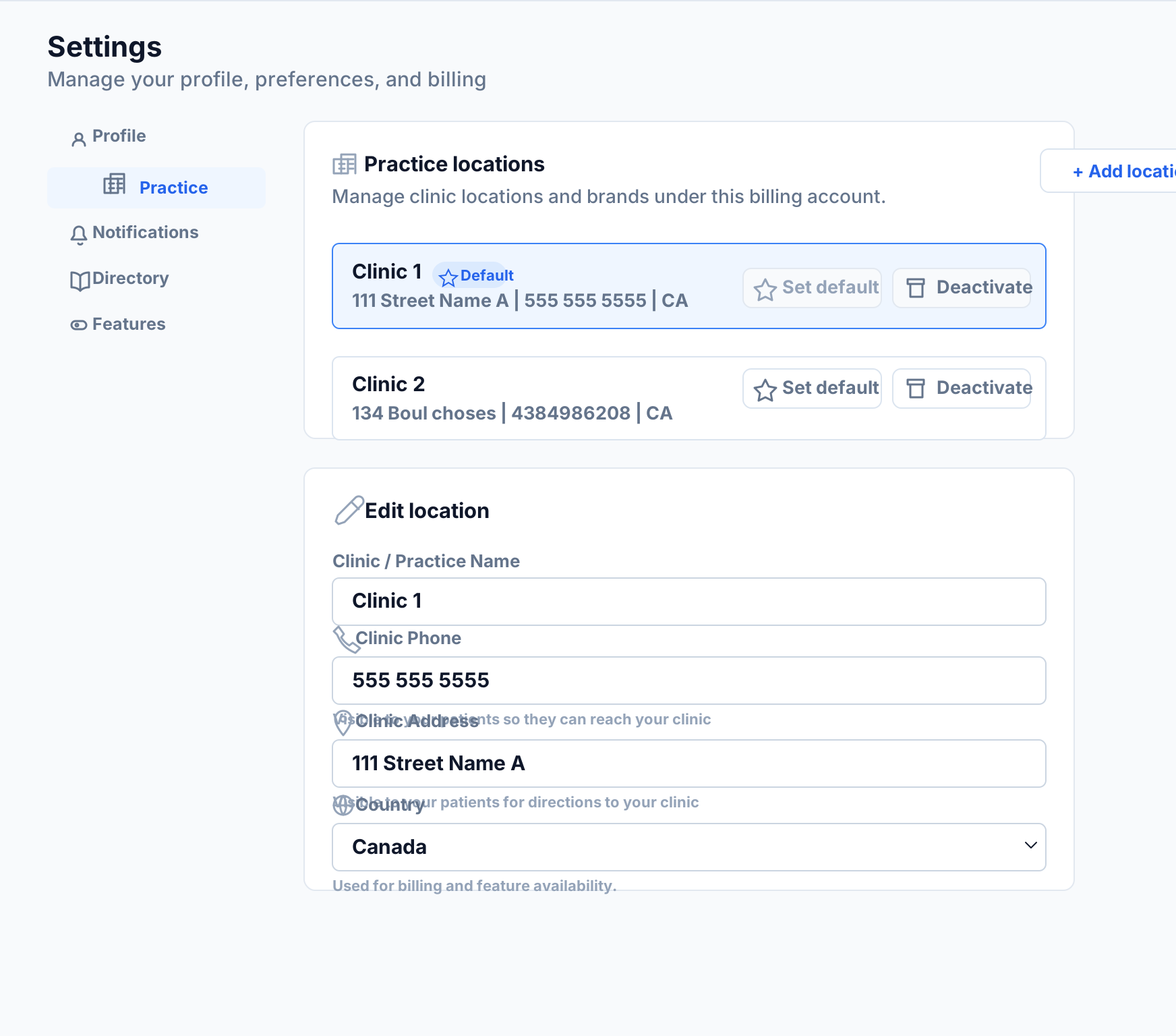
In Settings -> Practice, clinics can now manage more than one practice location or brand.
Each location can have its own:
- Clinic or practice name
- Phone number
- Address
- Country
- Weight unit preference
- License number
- NPI
- Specialty
One location is marked as the default. The default is used when a workflow does not require an explicit location choice, so existing clinic setup still behaves predictably.
Patient Onboarding Now Uses the Right Practice
When a clinic has more than one active practice location, the Add Patient workflow includes a practice selector. That lets the clinician choose which location the patient should be onboarded under.
That selection follows the patient into downstream workflows so reports, clinic contact details, and practice identity can reflect the correct location rather than a generic account-level profile.
For clinics with only one location, the workflow stays simple. The selector stays out of the way and the default practice is used automatically.
Why This Matters
Multi-location clinics need a single account structure without losing operational context.
A few examples:
- A clinic group has a downtown location and a satellite location.
- A provider operates two brands that share billing administration.
- A practice wants one subscription relationship but separate patient-facing contact details.
- A clinic wants discharge reports and patient instructions to show the location that actually manages that patient’s care.
This is the kind of detail that reduces administrative cleanup. The patient gets the right clinic identity. The clinician chooses the location at setup. The billing account stays unified.
Professional Tier Access
Multiple practice locations are available on the Professional tier and above.
Starter accounts can continue using one practice location. If a Starter account already has a location, Pro Portal will keep the Add Location action gated and explain that Professional access is required for additional locations. The backend also enforces this rule, so the tier boundary is not just a UI state.
How to Use It
- Open Pro Portal.
- Go to Settings -> Practice.
- Select Add location.
- Enter the clinic details for that location.
- Use Set default if this should be the primary practice.
- When adding a patient, choose the correct practice location if more than one is active.
Existing clinics do not need to migrate anything manually. Your current practice profile becomes the default location, and you can add more locations as needed.
A Small Change With a Big Workflow Impact
This update is designed for real clinic operations: shared billing, multiple physical sites, and patient records that need to stay attached to the right practice identity.
It is live in Pro Portal now for Professional-tier clinics.
Tags
Written by
VOR Eye Rehab Team
Expert insights on vestibular rehabilitation and eye health.
Related Articles
Choosing Vestibular Rehabilitation Software: A Clinician's Evaluation Checklist
An evidence-informed checklist for vestibular clinicians evaluating rehabilitation software, remote monitoring platforms, and home-exercise delivery tools.
Eye Rehab Editorial Team
October 29, 2026
Why Does Scrolling on My Phone Make Me Dizzy?
Learn why scrolling may provoke dizziness, practical ways to reduce screen motion, and when symptoms need a visual, vestibular or medical assessment.
Ilyas Bakouch, Founder of EyeRehab
October 7, 2026
Find a Provider: 735 Clinic Listings Now in Eye Rehab
Browse 735 clinic listings in Eye Rehab. Search by clinic name or city, filter by specialty, and learn what happens when you send a connection request.
Ilyas Bakouch, Founder of Eye Rehab
September 5, 2026