Visual Therapy Studio: Large-Screen Oculomotor and Cervical Training for Clinicians
VOR Eye Rehab now supports projector and TV display for wide-field oculomotor and C-spine proprioception training. Learn how clinicians can use it in practice.
VOR Eye Rehab Team
Published on February 22, 2026
Listen to this article
Natural Language Narration · 8 min
Many patients recovering from concussions, traumatic brain injuries, or motor vehicle accidents present with both vestibular dysfunction and cervical spine involvement. The mismatch between visual input, neck proprioceptive feedback, and inner ear gravitational signals is a well-documented driver of persistent dizziness. Until now, addressing oculomotor and cervical proprioception simultaneously required specialized hardware like head-mounted lasers and physical target flags.
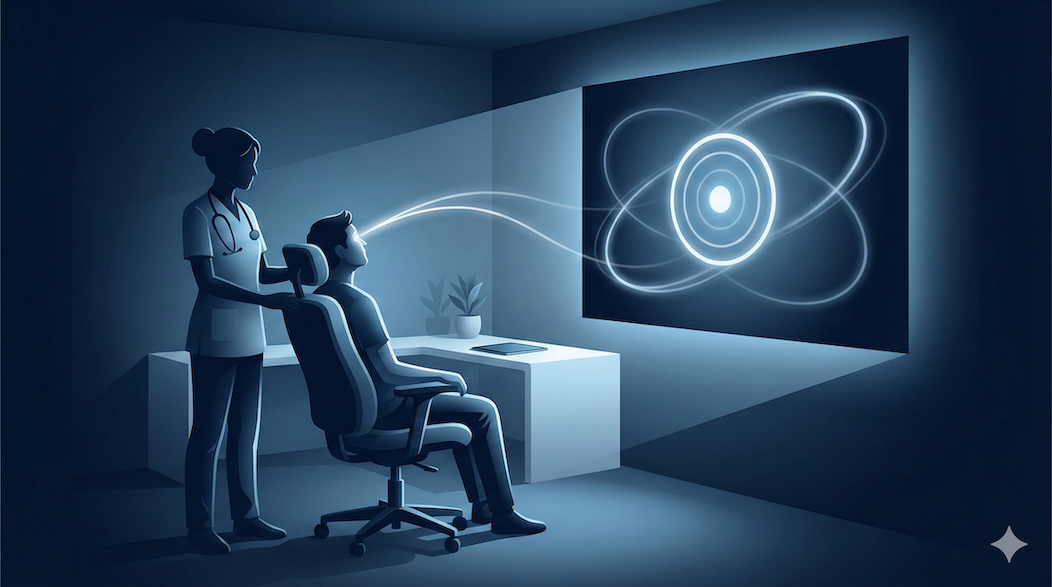
VOR Eye Rehab now includes Visual Therapy Studio — a clinical tool that turns any projector, TV, or second monitor into a wide-field rehabilitation display controlled from a laptop.
Why Screen Size Matters for Cervical Training
Mobile screens are effective for isolated oculomotor exercises, but they limit the range of head movement a patient can achieve during training. A phone held at arm’s length subtends a narrow visual angle, which means patients can track targets with eye movements alone, without meaningful cervical rotation.
A projected display on a wall or ceiling changes the equation. When targets span a wide field of view, patients must combine eye movements with head turns, engaging cervical proprioceptors throughout their available range of motion. This combined oculomotor-cervical approach mirrors the demands of real-world functional tasks — scanning a room, checking blind spots while driving, or navigating a busy environment.
“Proprioceptive training of the cervical spine is essential in patients with dizziness of cervical origin, where impaired neck sensory input contributes to spatial disorientation.” — Reiley et al., Journal of Neurologic Physical Therapy
How Visual Therapy Studio Works
Visual Therapy Studio uses a dual-window architecture designed for clinical workflows:
- Control Panel — runs on the clinician’s laptop screen. Select patterns, adjust parameters in real-time, link a patient record, and manage the session timer.
- Display Window — a separate browser window that the clinician drags to the projector or TV. Shows only the rehabilitation pattern on a pure black background, with no interface elements visible to the patient.
The two windows communicate in real-time, so any adjustment the clinician makes — changing speed, switching patterns, pausing the session — appears instantly on the projected display.
Getting Started
- Connect a projector or TV to your laptop (HDMI, USB-C, or wireless display)
- Open the Pro Portal and navigate to Projector in the sidebar
- Click Open Display — a new window appears
- Drag the display window to your projector screen and press F11 for fullscreen
- Select a pattern, adjust parameters, and click Start
No additional hardware or software is needed. Any modern browser and display setup works.
Pattern Library
Visual Therapy Studio includes 10 pattern presets organized into two categories that target different clinical goals.
Static Patterns
Static patterns present fixed target positions that highlight one at a time. The patient moves their head to fixate on each target, training cervical ROM awareness and proprioceptive accuracy.
- Center Target — Single point at screen center. Useful for establishing cervical neutral and postural awareness.
- Cardinal Points — Targets arranged at compass positions (N, S, E, W and diagonals). Trains controlled cervical rotation and lateral flexion in discrete directions.
- Grid — Configurable grid (3x3 to 5x5) with targets that light up in sequence or random order. Systematic cervical ROM mapping across the full visual field.
- Bullseye — Concentric rings with targets at graduated distances from center. Inner targets require small head movements, outer targets require larger ROM — useful for graded progression.
Dynamic Patterns
Dynamic patterns move a target continuously across the screen. The patient tracks the target with combined eye and head movements, training smooth pursuit and reactive cervical control.
- Horizontal Sweep — Target moves left-right across the full screen width. Primary cervical rotation training with adjustable speed and amplitude.
- Vertical Sweep — Target moves up-down. Trains cervical flexion and extension.
- Circle — Target traces a circular path. Combined multi-plane ROM with smooth pursuit demands.
- Figure-8 — Target traces an infinity pattern. Multi-directional cervical ROM with continuous direction changes.
- Diagonal Cross — Target moves along diagonal paths. Engages combined rotation and lateral flexion.
- Random Walk — Target moves to unpredictable positions with configurable dwell time. Trains reactive tracking and unpredictable proprioceptive demands, closer to real-world conditions.
Live Parameter Adjustment
Every pattern supports real-time parameter tuning during the session:
- Speed (0.5x to 3x) — Slow speeds for acute patients, faster for progressive challenge
- Target Size (Small, Medium, Large) — Larger targets for initial sessions, smaller for advanced training
- Amplitude (25% to 100% of screen) — Controls how much of the screen the pattern uses, directly affecting required cervical ROM
- Dwell Time (1s to 10s) — For static patterns, how long each target stays highlighted before advancing
- Color Theme (White, Blue, or Green on black) — High-contrast options optimized for projector visibility
- Trail (Off, Short, Long) — Shows the motion path behind the target, helping patients anticipate movement direction
All adjustments take effect immediately on the projected display. There is no need to stop and restart the session to change parameters.
Optional Patient Linking and Session Logging
Projector sessions can optionally be linked to a patient’s record in the system. When a patient is selected before starting a session, the system logs which patterns were used, their parameter settings, and the total session duration. This data integrates with the existing patient timeline and can contribute to Remote Therapeutic Monitoring documentation.
When no patient is linked, Visual Therapy Studio functions as a standalone clinical tool with no data saved.
Clinical Applications
Based on feedback from physical therapists working with vestibular and concussion populations, common use cases include:
- Post-concussion cervical proprioception deficits — Graded exposure to wide-field tracking tasks that require cervical ROM beyond what a handheld device can demand
- Cervicogenic dizziness — Combined oculomotor and cervical retraining where the patient must integrate neck position sense with visual tracking
- VOR gain training — Large-amplitude head movements during pursuit tasks, progressively increasing speed
- Group exercise sessions — Multiple patients can follow the same projected pattern simultaneously, useful for vestibular rehabilitation group classes
- Home exercise programs — Patients with smart TVs or projectors can use the display window at home for more engaging and effective exercises
Getting Access
Visual Therapy Studio is available to all Pro Portal users. Log in to the Pro Portal, and you will find Projector in the sidebar navigation. No additional subscription or hardware purchase is required.
This content is for informational purposes only and does not replace professional medical advice, diagnosis, or treatment. Always consult a qualified healthcare provider for clinical decision-making.
Tags
Written by
VOR Eye Rehab Team
Expert insights on vestibular rehabilitation and eye health.
Related Articles

VOR Exercises for Blurry Vision With Head Movement
Connect VOR exercises to blurry vision during head movement and explain safe progression for gaze stability.
EyeRehab - VOR Training Team
September 11, 2026
Keep Your Eyes on the Target: Hands-Free Pace Audio for VOR Training
Eye Rehab 5.07.101 adds Off, Ticks, and Tones for VOR x1 and VOR x2, plus a sustained correction cue when head tracking detects persistent pace drift.
Ilyas Bakouch, Founder of Eye Rehab
September 10, 2026
VOR X2 Exercises: When to Progress Beyond VOR X1
A practical guide to VOR x2 exercises, including when they are appropriate, how they differ from VOR x1, and how to pace progression.
EyeRehab - VOR Training Team
September 1, 2026